
I have been writing packet sniffers with libpcap for most of my career, and I
still have a soft spot for it. One of the tools I keep coming back to is
mqs, a little MariaDB/MySQL query sniffer I
wrote because I wanted to see the indicators MISP was about to commit to its
database — as they went past on the wire, before the rows landed. Putting a
proxy in front of the database would have been overkill; sniffing dst port
3306 and handing each query to a LuaJIT script that kept only the INSERTs
was not. It still works, and I still like it.
What mqs also taught me is exactly where libpcap stops. libpcap gives you
bytes. Everything above the link layer is your problem: Ethernet, then IP,
then the TCP stream, then MySQL’s own framing, and only then the query you
actually came for. Most of mqs is that plumbing, not the part I cared about.
And a BPF filter can say dst port 3306, but it cannot say
mysql.query contains "INSERT INTO attributes", because BPF matches byte
offsets in packets, not fields in protocols. The moment you want the second
thing, you are writing a dissector.
So in libpcapng I put the dissector and the display-filter engine inside the library. Same filter syntax as Wireshark’s, same field names, applied to a file you just read or to a live interface. This post builds the smallest useful sniffer on top of that — the one that prints what each packet is — three times over, in C, Python and Go.
How the pieces fit
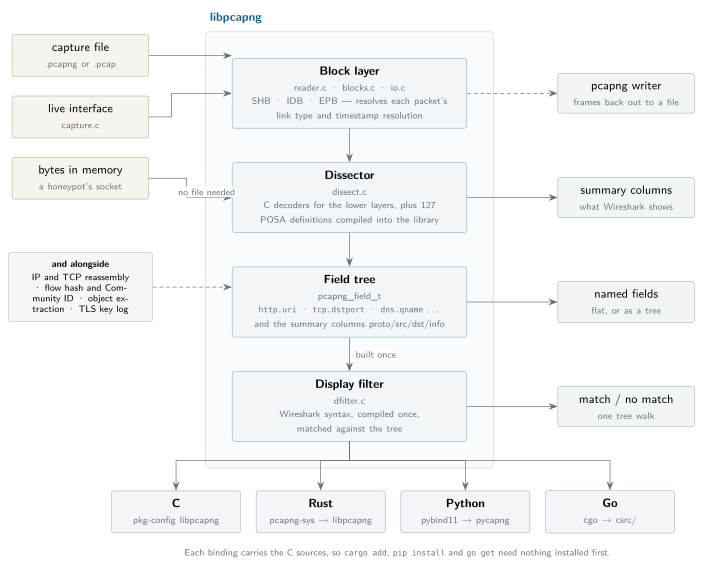
The shape worth remembering is the middle column. Bytes arrive from a file, an
interface, or a buffer you already hold; the block layer turns them into
packets with their link type and timestamp resolved; the dissector builds a
field tree; and a compiled display filter walks that tree. The bindings are
thin — each one carries the same C sources, which is why pip install,
go get and cargo add need nothing on the machine first.
What we are building
Fifty-odd lines that turn a capture file into Wireshark’s summary columns:
   1  HTTP   203.0.113.9     -> 10.0.0.5         GET /index.html HTTP/1.1
   2  DNS    203.0.113.9     -> 8.8.8.8          Query 0x1234 A example.com
   3  TLS    203.0.113.9     -> 10.0.0.5         Handshake Client Hello

3 packet(s)
…and take an optional display filter as a second argument, so that
./sniff capture.pcapng 'http.headers.user_agent contains "curl"'
prints only the first line. No protocol parsing of our own, in any of the three languages.
The shape is the same everywhere, and it is three calls:
- Load the decoders —
ensure_protocols(). - Read packets — one callback per frame, with its link type and timestamp already worked out.
- Dissect, then match — dissect once, test as many compiled filters against the result as you like.
Getting libpcapng
git clone https://github.com/stricaud/libpcapng
cd libpcapng
mkdir build && cd build
cmake .. -DCMAKE_BUILD_TYPE=Release
make -j
sudo make install
The bindings come from the same tree: pip install pycapng for Python,
go get github.com/stricaud/libpcapng/bindings/go for Go, and
libpcapng on crates.io for Rust.
Everything below needs 0.19.7 or later
A capture to test against
Any capture file will do — tcpdump -w capture.pcap, or whatever Wireshark
last saved. If you want the exact three packets the output above shows, write
them with pycapng:
#!/usr/bin/env python3
import pycapng

CLIENT, SERVER = "02:00:00:00:00:01", "02:00:00:00:00:02"

p = pycapng.PcapNG()
p.OpenFileLinkType("sample.pcapng", "w", pycapng.LINKTYPE_ETHERNET)

p.WritePacket(p.BuildTcpPacket(
    src_mac=CLIENT, dst_mac=SERVER,
    src_ip="203.0.113.9", dst_ip="10.0.0.5",
    src_port=54321, dst_port=80,
    data=b"GET /index.html HTTP/1.1\r\n"
         b"Host: www.example.com\r\n"
         b"User-Agent: curl/8.4.0\r\n\r\n"))

p.WritePacket(p.BuildDnsQuery(
    src_mac=CLIENT, dst_mac=SERVER,
    src_ip="203.0.113.9", dst_ip="8.8.8.8",
    src_port=51000, dst_port=53,
    transaction_id=0x1234, domain="example.com"))

p.WritePacket(p.BuildTlsClientHello(
    src_mac=CLIENT, dst_mac=SERVER,
    src_ip="203.0.113.9", dst_ip="10.0.0.5",
    src_port=54322, dst_port=443))

p.CloseFile()
Note OpenFileLinkType rather than OpenFile: every Build* helper returns a
complete Ethernet frame, and the file has to say so.
Ethernet is the default, so OpenFile is fine there; being explicit still is
not wasted, because the day you write something that is not Ethernet,
the file has to say so. A capture whose interface disagrees with its packets
is the single easiest way to waste an afternoon with this library.
C
/* sniff.c — read a capture, say what each packet is. */
#include <stdio.h>
#include <libpcapng/reader.h>
#include <libpcapng/dissect.h>
#include <libpcapng/dfilter.h>

static pcapng_dfilter_t *filter;

static int on_packet(const pcapng_packet_t *pkt, void *user)
{
    pcapng_dissection_t *d;
    (void)user;

    d = pcapng_dissect(pkt->data, pkt->captured_len, pkt->captured_len,
                       pkt->linktype);
    if (!d)
        return 0;

    if (!filter || pcapng_dfilter_match(filter, d->root))
        printf("%4llu  %-6s %-15s -> %-15s  %s\n",
               (unsigned long long)pkt->index, d->proto, d->src, d->dst,
               d->info);

    pcapng_dissection_free(d);
    return 0;   /* non-zero stops the read */
}

int main(int argc, char **argv)
{
    char err[256] = "";
    long n;

    if (argc < 2) {
        fprintf(stderr, "usage: %s CAPTURE.pcapng ['display filter']\n",
                argv[0]);
        return 2;
    }

    pcapng_dissect_ensure_protocols();

    if (argc > 2) {
        filter = pcapng_dfilter_compile(argv[2], err, sizeof err);
        if (!filter) {
            fprintf(stderr, "bad filter: %s\n", err);
            return 1;
        }
    }

    n = pcapng_read_packets(argv[1], on_packet, NULL);
    if (n < 0) {
        fprintf(stderr, "cannot read %s\n", argv[1]);
        return 1;
    }
    fprintf(stderr, "\n%ld packet(s)\n", n);

    if (filter)
        pcapng_dfilter_free(filter);
    return 0;
}
Build and run:
cc -o sniff sniff.c $(pkg-config libpcapng --cflags --libs)
./sniff sample.pcapng
./sniff sample.pcapng 'tls.handshake_type == 1'
If you would rather not install the library system-wide, point the compiler at the tree you just built:
cc -o sniff sniff.c -I path/to/libpcapng/lib/include \
       -L path/to/libpcapng/build/lib -lpcapng
Worth noticing what is not in that file. No Ethernet header struct, no
ntohs, no IP header length arithmetic, no TCP stream reassembly, no HTTP
request-line parser. pcapng_read_packets hands over one frame per call with
its link type already resolved from the interface it belongs to and its
timestamp already scaled by that interface’s resolution — the two things that
are easy to get subtly wrong when you walk pcapng blocks yourself, and that
fail silently when you do, because dissecting from four bytes off produces an
answer rather than an error.
pcapng_dissect returns the summary columns and a field tree;
pcapng_dfilter_match walks that tree. The split matters: compiling a filter
happens once at startup, dissecting a packet costs microseconds, and matching a
compiled filter against the result costs nanoseconds. Thirty filters should
mean one dissection and thirty tree walks.
Python
#!/usr/bin/env python3
"""sniff.py — read a capture, say what each packet is."""
import sys

import pycapng


def main():
    if len(sys.argv) < 2:
        sys.exit(f"usage: {sys.argv[0]} CAPTURE.pcapng ['display filter']")

    pycapng.ensure_protocols()
    want = pycapng.Filter(sys.argv[2] if len(sys.argv) > 2 else "")

    def each(pkt):
        d = pycapng.dissect(pkt.data, pkt.linktype)
        if d and want.matches(d):
            print(f"{pkt.index:4}  {d.proto:6} {d.src:15} -> {d.dst:15}  {d.info}")
        return True          # False stops the read

    n = pycapng.foreach_packet(sys.argv[1], each)
    print(f"\n{n} packet(s)", file=sys.stderr)


if __name__ == "__main__":
    main()
python3 sniff.py sample.pcapng
python3 sniff.py sample.pcapng 'http.headers.user_agent contains "curl"'
Filter("") matches everything, which is why there is no if want in the
loop. A filter that will not compile raises ValueError right where it is
written:
ValueError: cannot compile display filter: expected a value after operator
That is deliberate. A typo in a filter should fail at startup, not quietly match nothing on every packet for the rest of the run.
If you want the whole capture in memory rather than a callback,
pycapng.read_packets(path) returns a list of the same objects, and
read_packets_mem(buf) does it for bytes you already hold.
Go
package main

import (
	"fmt"
	"os"

	pcapng "github.com/stricaud/libpcapng/bindings/go"
)

func main() {
	if len(os.Args) < 2 {
		fmt.Fprintf(os.Stderr, "usage: %s CAPTURE.pcapng ['display filter']\n", os.Args[0])
		os.Exit(2)
	}

	pcapng.EnsureProtocols()

	var want *pcapng.Filter
	if len(os.Args) > 2 {
		f, err := pcapng.NewFilter(os.Args[2])
		if err != nil {
			fmt.Fprintln(os.Stderr, "bad filter:", err)
			os.Exit(1)
		}
		defer f.Close()
		want = f
	}

	n, err := pcapng.ReadPackets(os.Args[1], func(p *pcapng.Packet) bool {
		d, err := pcapng.Dissect(p.Data, p.Linktype)
		if err != nil || d == nil {
			return true
		}
		if want.Match(d) {
			fmt.Printf("%4d  %-6s %-15s -> %-15s  %s\n",
				p.Index, d.Protocol, d.Src, d.Dst, d.Info)
		}
		return true // false stops the read
	})
	if err != nil {
		panic(err)
	}
	fmt.Fprintf(os.Stderr, "\n%d packet(s)\n", n)
}
go mod init sniffdemo
go get github.com/stricaud/libpcapng/bindings/go
go build -o sniff .
./sniff sample.pcapng 'udp'
The binding vendors the C sources, so go build compiles the library as part
of your program — CGo and a C compiler are the only requirements, and there is
nothing to install first. A nil *Filter matches everything, which is the Go
equivalent of the empty filter above.
To build against a checkout rather than whatever the module proxy has — which is also how you test a fix before it is tagged — point the module at it:
go mod edit -replace github.com/stricaud/libpcapng/bindings/go=../libpcapng/bindings/go
The two things that will bite you
Loading the decoders is not optional
Most of libpcapng’s protocol knowledge is not C code. It is
POSA
definitions — a small declarative language for protocol layouts — compiled
into the library and registered on demand. Until ensure_protocols() has run,
you get only the built-in C dissectors, and that failure is quiet in the worst
way:
without ensure_protocols() |
with | |
|---|---|---|
d.proto for an HTTP request |
TCP |
HTTP |
http.uri in the field tree |
absent | /index.html |
filter http.uri contains "/index" |
matches nothing | matches |
No error, no warning — just a sniffer that sees less than it should, and a filter you will spend twenty minutes re-reading because it looks correct. It is idempotent and cheap, so call it at startup, before you compile a filter.
Field names are mostly Wireshark’s, not always
The names come from the POSA definitions, and they follow Wireshark where it is
natural, but not slavishly. TLS is the one that catches me: Wireshark says
tls.handshake.type, libpcapng says tls.handshake_type. A filter naming a
field that does not exist compiles fine and matches nothing — field names come
into existence during dissection, so there is no registry to check a name
against at compile time.
Rather than guess, ask a packet what it has. flat() collapses the whole
field tree to {name: value}:
import pycapng

pycapng.ensure_protocols()
pkt = pycapng.read_packets("sample.pcapng")[0]
d = pycapng.dissect(pkt.data, pkt.linktype)

print([f["abbrev"] for f in d.fields])
# ['frame', 'eth', 'ip', 'tcp', 'http']

for name, value in d.flat().items():
    print(f"{name:28} {value!r}")
frame                        ''
frame.len                    129
frame.cap_len                129
eth                          ''
eth.dst                      '02:00:00:00:00:02'
eth.src                      '02:00:00:00:00:01'
eth.type                     2048
ip                           ''
ip.version                   4
ip.hdr_len                   20
...
ip.src                       '203.0.113.9'
ip.dst                       '10.0.0.5'
tcp                          ''
tcp.srcport                  54321
tcp.dstport                  80
...
tcp.flags.push               1
tcp.flags.ack                1
...
communityid                  '1:rdljTHDUmQwTTPaAFRaOWNSJraA='
http                         ''
http.method                  'GET'
http.uri                     '/index.html'
http.version                 'HTTP/1.1'
http.headers                 ''
http.headers.host            'www.example.com'
http.headers.user_agent      'curl/8.4.0'
http.body                    ''
Two freebies in there worth pointing at: tcp.flags.push and friends are
broken out as individual fields, so tcp.flags.syn == 1 and tcp.flags.ack == 0
works as a filter; and communityid is the
Community ID flow hash,
computed for every packet, which is what you join on when you want to line
these packets up against Zeek or Suricata logs.
That is also the fastest way to learn what a protocol decoder actually
exposes. d.fields gives you the layers with their children if you want the
structure; flat() is what you want when you are hunting for one value and do
not care where it sits. Note the types: tcp.dstport comes back as an int,
http.uri as a str.
From a file to an interface
Everything above reads a file, because that is the version you can run on a laptop without root. Live capture is the same dissect-then-match loop behind a different source — in Python:
import pycapng

with pycapng.Capture("eth0") as cap:
    cap.set_filter("tcp.dstport == 443")
    cap.loop(0, lambda pkt: print(pkt.captured_len, "bytes"))
The filter attached to a live capture is the same display-filter syntax, not
BPF. Which brings me back to mqs: the query sniffer I would write today would
not parse MySQL framing at all. It would be this loop, with
mysql.query contains "INSERT" as the filter, and the Lua script would get
fields instead of bytes.
The three programs in this post are in the repository under
bindings/*/README and doc/; if you spot something that does not work the
way it is written here, please open an issue.